|
|
||
|---|---|---|
| .github/workflows | ||
| docs | ||
| src/eynollah | ||
| tests | ||
| train | ||
| .dockerignore | ||
| .gitignore | ||
| CHANGELOG.md | ||
| Dockerfile | ||
| LICENSE | ||
| Makefile | ||
| ocrd-tool.json | ||
| pyproject.toml | ||
| README.md | ||
| requirements-ocr.txt | ||
| requirements-plotting.txt | ||
| requirements-test.txt | ||
| requirements-training.txt | ||
| requirements.txt | ||

Eynollah
Document Layout Analysis, Binarization and OCR with Deep Learning and Heuristics






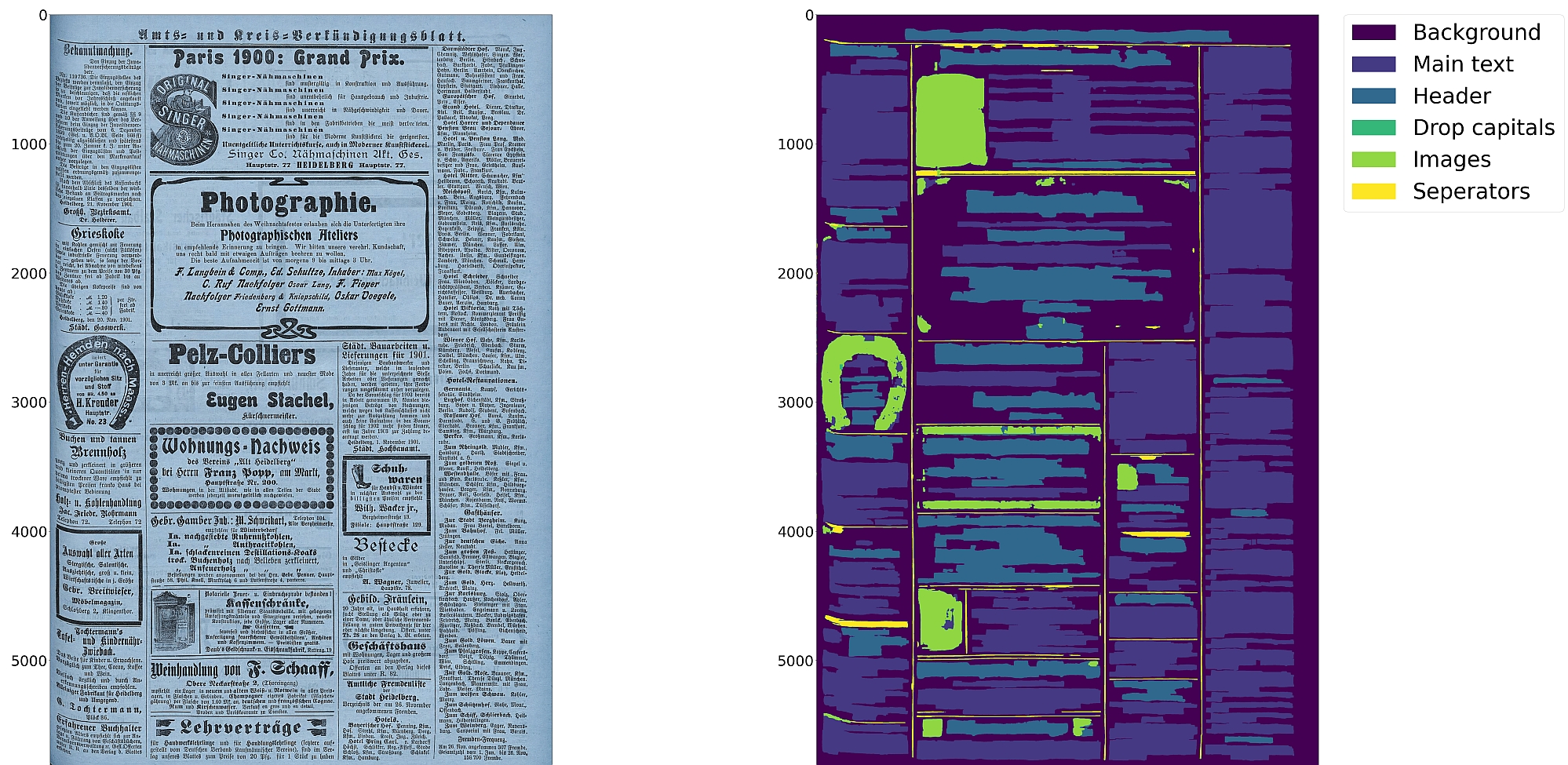
Features
- Document layout analysis using pixelwise segmentation models with support for 10 segmentation classes:
- background, page border, text region, text line, header, image, separator, marginalia, initial, table
- Textline segmentation to bounding boxes or polygons (contours) including for curved lines and vertical text
- Document image binarization with pixelwise segmentation or hybrid CNN-Transformer models
- Text recognition (OCR) with CNN-RNN or TrOCR models
- Detection of reading order (left-to-right or right-to-left) using heuristics or trainable models
- Output in PAGE-XML
- OCR-D interface
⚠️ Development is focused on achieving the best quality of results for a wide variety of historical documents using a combination of multiple deep learning models and heuristics; therefore processing can be slow.
Installation
Python 3.8-3.11 with ONNX Runtime on Linux are currently supported.
For GPU support, NVidia drivers supporting CUDA 12 must be installed. The runtime dependencies will pull in ONNX, TensorRT and CUDA runtime libraries (including cuDNN) from PyPI.
You can either install from PyPI
pip install eynollah
or clone the repository, enter it and install (editable) with
git clone git@github.com:qurator-spk/eynollah.git
cd eynollah; pip install -e .
Alternatively, you can run make install or make install-dev for editable installation.
To also install the dependencies for the OCR engines:
pip install "eynollah[OCR]"
# or
make install EXTRAS=OCR
Note
as they may need Tensorflow (with tf-keras) and/or Torch (with transformers). Those two frameworks may also have conflicting CUDA dependencies. An ONNX conversion for these models may be achieved soon. 🚧
Docker
Use
docker pull ghcr.io/qurator-spk/eynollah:latest
When using Eynollah with Docker, see docker.md.
Models
Pretrained models can be downloaded from Zenodo or Hugging Face.
For fast runtime inference, download the ONNX models.
For finetuning training, download the original (Tensorflow / Torch) models
(and install the [training] extra).
For model documentation and model cards, see models.md.
Training
To train your own model with Eynollah, see train.md and use the tools in the train folder.
Usage
Eynollah supports five use cases:
- layout analysis (segmentation),
- binarization,
- image enhancement,
- text recognition (OCR), and
- reading order detection.
Some example outputs can be found in examples.md.
The generic options shared by all subcommands are:
  -m <directory containing model files>
  -mv <model category> <model variant> <model path>
  -D <device specifier>
  -l <log level>
Layout Analysis
Detects layout elements, i.e. regions of various types and text lines, and determines their reading order using either heuristic methods or a pretrained model.
The command-line interface for layout analysis can be called like this:
eynollah [GENERIC_OPTIONS] layout \
  -i <single image file> | -di <directory containing image files> \
  -o <output directory> \
     [OPTIONS]
The following options can be used to further configure the processing:
| option | description |
|---|---|
-fl |
full layout analysis including all steps and segmentation classes (recommended) |
-tab |
apply table detection |
-ae |
apply enhancement (the resulting image is saved to the output directory) |
-as |
apply scaling |
-cl |
apply contour detection for curved text lines, deskewing all regions independently |
-ib |
apply binarization (the resulting image is saved to the output directory) |
-ep |
enable plotting (MUST always be used with -sl, -sd, -sa, -si or -ae) |
-ho |
ignore headers for reading order dectection |
-si <directory> |
save image regions detected to this directory |
-sd <directory> |
save deskewed image to this directory |
-sl <directory> |
save layout prediction as plot to this directory |
-sp <directory> |
save cropped page image to this directory |
-sa <directory> |
save all (plot, enhanced/binary image, layout) to this directory |
-thart |
confidence threshold of artifical boundary class during textline detection |
-tharl |
confidence threshold of artifical boundary class during region detection |
-ncu |
upper limit of columns in document image |
-ncl |
lower limit of columns in document image |
-slro |
skip layout detection and reading order |
-romb |
apply machine based reading order detection |
-ipe |
ignore page extraction |
-j |
number of CPU jobs to run parallel (useful with -di) |
-H |
when to halt when some jobs fail |
The default is to only perform layout detection of main regions (background, text, images, separators and marginals).
The best output quality is achieved when RGB images are used as input rather than greyscale or binarized images.
Additional documentation can be found in
usage.md.
Binarization
Performs document image binarization (thresholding) using pretrained pixelwise segmentation models.
The command-line interface for binarization can be called like this:
eynollah [GENERIC_OPTIONS] binarization \
  -i <single image file> | -di <directory containing image files> \
  -o <output directory> \
  [OPTIONS]
Image Enhancement
This enlarges and enhances images. Useful in case the scan quality is low.
eynollah [GENERIC_OPTIONS] enhancement \
  -i <single image file> | -di <directory containing image files> \
  -o <output directory> \
  [OPTIONS]
| option | description |
|---|---|
-sos |
save the enhanced image in original image size |
-ncu |
upper limit of columns in document image |
-ncl |
lower limit of columns in document image |
OCR
Performs text recognition using either a CNN-RNN model or a Transformer model. Needs a PAGE-XML input file.
The command-line interface for OCR can be called like this:
eynollah [GENERIC_OPTIONS] ocr \
  -i <single image file> | -di <directory containing image files> \
  -dx <directory of xmls> \
  -o <output directory> \
The following options can be used to further configure the ocr processing:
| option | description |
|---|---|
-trocr |
use transformer OCR model instead of CNN-RNN model |
-dib |
directory of binarized images (file type must be '.png'), prediction with both RGB and bin |
-doit |
directory for output images rendered with the predicted text |
-nmtc |
cropped textline images will not be masked with textline contour |
-bs |
ocr inference batch size. Default batch size is 2 for trocr and 8 for cnn_rnn models |
-min_conf |
minimum OCR confidence value. OCR with textline conf lower than this will be ignored |
Reading Order Detection
Reading order can be detected either during layout analysis, or as a separate module, which requires a PAGE-XML input file.
The command-line interface for machine based reading order can be called like this:
eynollah [GENERIC_OPTIONS] machine-based-reading-order \
  -i <single image file> | -di <directory containing image files> \
  -xml <xml file name> | -dx <directory containing xml files> \
  -o <output directory>
Use as OCR-D processor
See ocrd.md.
How to cite
@inproceedings{hip23rezanezhad,
  title     = {Document Layout Analysis with Deep Learning and Heuristics},
  author    = {Rezanezhad, Vahid and Baierer, Konstantin and Gerber, Mike and Labusch, Kai and Neudecker, Clemens},
  booktitle = {Proceedings of the 7th International Workshop on Historical Document Imaging and Processing {HIP} 2023,
               San José, CA, USA, August 25-26, 2023},
  publisher = {Association for Computing Machinery},
  address   = {New York, NY, USA},
  year      = {2023},
  pages     = {73--78},
  url       = {https://doi.org/10.1145/3604951.3605513}
}